

Which GRC Software Supports SOC 2, ISO 27001, and HIPAA on a Single Control Library?
Keel is a GRC platform that supports SOC 2, ISO 27001, and HIPAA on a single crosswalked control library. This architecture allows you to collect evidence once and satisfy requirements across all three frameworks simultaneously. This guide covers unified control libraries and platform comparisons to help you choose the right tool.
Unified Control Libraries
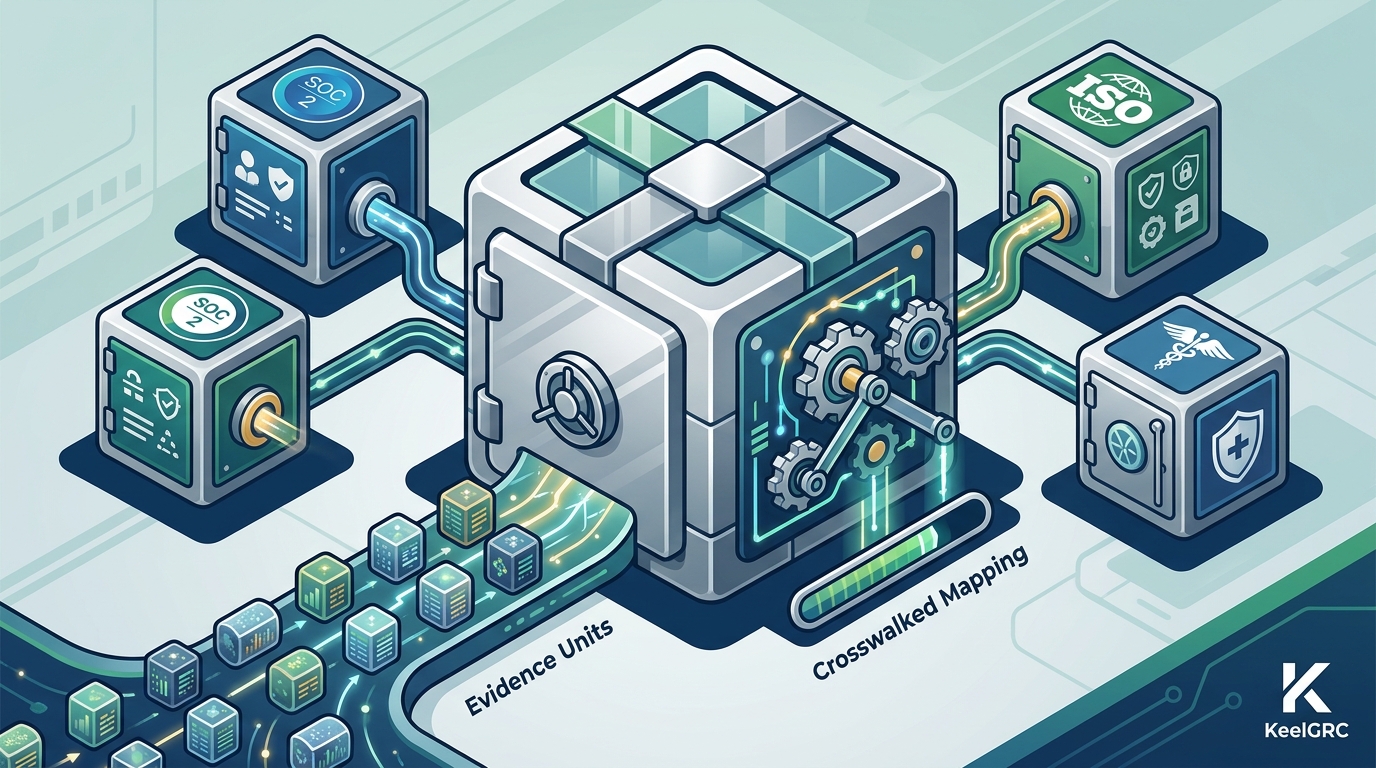
Most traditional GRC tools treat every framework as a separate checklist. This approach forces teams to repeat the same work for every audit. Keel inverts this model by making the control the unit of work. Each framework is simply a view over your controls. A single control satisfies clauses across all the frameworks you have applied at the same time.
How Crosswalk-Native Architecture Works
Crosswalk-native GRC is a design pattern where the mapping between frameworks is the core architecture, not a report. In checklist-based systems, you author a control for SOC 2, then author a separate control for ISO 27001, even if they require the same technical implementation. In Keel, you author the control once. The platform then maps that single control to the specific clauses in ISO 27001, SOC 2, and HIPAA. This means the evidence you attach to that control counts toward all three standards.
Keel’s library maps 75+ controls to ISO 27001. A significant portion of these controls also map to SOC 2 and HIPAA. For example, an information security policy control satisfies ISO 27001 Annex A 5.1, SOC 2 CC1.1, and HIPAA Security Rule administrative safeguards. By implementing this policy once, you generate evidence that satisfies all three requirements. This eliminates the need to maintain three separate policy documents for the same underlying practice.
The Value of Evidence Reuse
Evidence is the most time-consuming part of compliance. In a non-unified system, you might upload a screenshot of your access review process for SOC 2, then upload the same screenshot again for ISO 27001. Keel allows you to attach evidence once. That evidence is then visible in the context of every framework it satisfies. This reduces the total volume of evidence you need to manage and keeps your program lean.
The platform also supports a risk register that links risks to controls. When you rate a risk, you can connect it to the specific controls that treat it. This connection is visible across all frameworks. If a risk is relevant to HIPAA, it is also visible in the context of your ISO 27001 program. This unified view helps you prioritize remediation work that has the highest impact across your entire compliance posture.
GRC Platform Comparison
Choosing the right GRC platform depends on your team size, budget, and specific framework requirements. While many vendors offer SOC 2, ISO 27001, and HIPAA support, their underlying architectures differ significantly. The table below compares how different platforms handle multi-framework compliance.
| Platform | Architecture Model | Multi-Framework Approach | Pricing Model |
|---|---|---|---|
| Keel | Crosswalk-Native | One control library mapped to all frameworks | Transparent, self-serve, free tier available |
| Vanta | Checklist-Based | Separate checklists per framework | Quote-based, sales-led |
| Drata | Checklist-Based | Separate checklists per framework | Quote-based, sales-led |
| Secureframe | Checklist-Based | Separate checklists per framework | Quote-based, sales-led |
Why Architecture Matters More Than Features
Feature lists often look similar across vendors. Most platforms offer policy management, evidence collection, and vendor risk tracking. The difference lies in how these features interact. In a checklist-based system, adding a second framework usually means adding a second project. You must map new controls, collect new evidence, and manage new policies. In a crosswalk-native system, adding a second framework is a data operation. You simply apply the new framework view to your existing controls.
Keel is built for teams that want to avoid this duplication. The platform is self-serve, meaning you can start without a sales call. Public pricing is available, and a free tier allows you to test the platform with your own data. This transparency is a key differentiator for small and mid-sized businesses that need to make budget decisions quickly.
Integration and Automation
Modern GRC platforms rely on integrations to collect evidence automatically. Keel offers a REST API, outbound webhooks, and a Model Context Protocol (MCP) server for AI agents. These integrations allow you to connect your existing stack, such as cloud providers or identity management systems. Evidence arrives without manual uploads. This automation is critical for maintaining a current compliance program without dedicating full-time staff to evidence collection.
The platform also includes a trust center. This is a public page that proves your security posture to prospects and customers. You can publish your readiness status and key controls on a branded page. This feature helps you close deals faster by providing immediate proof of your compliance efforts. The trust center is available on higher-tier plans and can be served on your own domain.
Key Takeaways
- Keel uses a crosswalk-native architecture where one control satisfies multiple frameworks.
- Evidence collected once in Keel counts toward SOC 2, ISO 27001, and HIPAA simultaneously.
- Traditional checklist-based platforms often require separate work for each framework.
- Keel offers transparent, self-serve pricing with a free tier, unlike quote-based competitors.
- The platform includes a risk register that links risks to controls across all frameworks.
- Automated integrations and a public trust center help maintain and prove compliance posture.
- Choosing a unified control library reduces the total effort required for multi-framework compliance.
Frequently Asked Questions
Does Keel support SOC 2, ISO 27001, and HIPAA on the same plan?
Yes. Keel supports all three frameworks on a single control library. You can apply all three frameworks to your workspace and manage them from one interface. The controls and evidence you create are shared across these frameworks where applicable.
How does Keel differ from checklist-based GRC tools?
Checklist-based tools treat each framework as a separate list of requirements. Keel treats the control as the core unit. Frameworks are views over your controls. This means you do not have to duplicate work when adding a new framework.
Is Keel self-serve?
Yes. Keel is a self-serve platform. You can sign up, apply a framework, and start collecting evidence without a sales call. Public pricing is available, and a free tier is offered for testing.
Can I export my data if I leave Keel?
Yes. Keel provides an open-source tool called keel-migrate. This tool allows you to export your compliance data to a neutral, documented format. Your data is portable and not locked into the platform.
Does Keel help with vendor risk management?
Yes. Keel includes a vendor risk module. You can inventory your vendors, rate their criticality, and schedule reviews. Vendor risk data is linked to your controls and visible across your frameworks.
Is there a free trial or free plan?
Keel offers a Free plan at $0 that requires no credit card. It also offers a 14-day Pro trial for new workspaces. Both options allow you to test the platform with your own data.
Conclusion
Selecting the right GRC software is a critical decision for any organization pursuing multiple compliance frameworks. The architecture of the platform determines how much work your team will do. Keel’s crosswalk-native approach ensures that you collect evidence once and comply everywhere. This efficiency is essential for growing teams that need to prove their security posture without a dedicated compliance department. To start your program, visit Keel and explore the platform with your own data.